
No readings on mode "Standard"
-
Hi Charles,
I've just installed 2 x Denky4 (v1.3a), one to a Linky in mode "Historique", and one to a different Linky in mode "Standard". These are to replace 2 existing Micro Teleinfo units which worked fine but I wanted to move to Tasmota. The mode Historique monitor on Linky #1 works perfectly, correct and consistent.But, the installation on the Standard mode on Linky #2 is not working. I believe the physical connection to the Linky is correct, and Wi-fi, MQTT work fine. No TIC monitoring data is being produced {}. No "SENSOR" records are generated. What am I doing wrong?
Thanks,
Tony -
Hi Charles,
I've just installed 2 x Denky4 (v1.3a), one to a Linky in mode "Historique", and one to a different Linky in mode "Standard". These are to replace 2 existing Micro Teleinfo units which worked fine but I wanted to move to Tasmota. The mode Historique monitor on Linky #1 works perfectly, correct and consistent.But, the installation on the Standard mode on Linky #2 is not working. I believe the physical connection to the Linky is correct, and Wi-fi, MQTT work fine. No TIC monitoring data is being produced {}. No "SENSOR" records are generated. What am I doing wrong?
Thanks,
Tony@ellipsis, does the blue light is blinking (if so TIC signal is seen), if so you can try to turn gently the potentiometer on the board, near the green connector (with a little screwdriver) to adjust TIC signal
Then may be seeing screenshot of Tasmota device config and teleinfo config may help, but should be okay if you suceeded with legacy mode.
Charles
-
@ellipsis, does the blue light is blinking (if so TIC signal is seen), if so you can try to turn gently the potentiometer on the board, near the green connector (with a little screwdriver) to adjust TIC signal
Then may be seeing screenshot of Tasmota device config and teleinfo config may help, but should be okay if you suceeded with legacy mode.
Charles
@Charles, thanks for replying. Unfortunately, I'm not onsite currently, so can't change the potentiometer. The blue light was illuminated, but I thought with a different pattern to the Denky connected in Historique mode. Just my impresssion though...
Hope all relevant information is included below.
One more info: In all my attempts to get this working, I did try swapping the two Denky units (reconfiguring eachtime), and that did not seem to resolve the issue. I didn't keep logs for that test though...
Thanks,
Tony
Info as requested:
{"NAME":"Denky D4 (v1.3a)","GPIO":[32,3200,0,3232,1,0,0,0,0,1,1376,1,0,0,0,0,0,640,608,0,0,0,0,0,0,0,5632,0,0,0,0,0,0,0,0,0],"FLAG":0,"BASE":1}Current auto-configuration : Current configuration: DenkyD4 V1.3a
[Console at restart:]
00:00:00.003 HDW: ESP32-PICO-V3-02 (PSRAM)
00:00:00.039 UFS: FlashFS mounted with 4392 kB free
00:00:00.059 CFG: Loaded from File, Count 22
00:00:00.069 QPC: Count 1
00:00:00.075 I2C: Bus1 using GPIO22(SCL) and GPIO21(SDA)
00:00:00.155 BRY: Berry initialized, RAM used=3933 bytes
00:00:00.219 CFG: Energy loaded from file
00:00:00.220 NRG: Init driver 15
00:00:00.230 Project tasmota - Tasmota Version 13.1.0.1(teleinfo)-2_0_11(2023-08-15T09:04:21)
00:00:00.232 TIC: RX on GPIO8, baudrate 1200
00:00:00.513 BRY: Successfully loaded 'autoexec.be'
00:00:01.305 WIF: Connecting to AP1 Breaghva Channel 5 BSSId XX:XX:XX:XX:XX:XX in mode 11n as AV-AJD-Power-1032...
00:00:02.293 WIF: Connected
00:00:02.551 HTP: Web server active on AV-AJD-Power-1032 with IP address 192.168.1.138
14:47:52.545 MQT: Attempting connection...
14:47:52.615 MQT: Connected
14:47:52.619 MQT: AV/AJD_Power/LWT = Online (retained)
14:47:52.623 MQT: AV/AJD_Power/cmnd/POWER =
14:47:52.627 MQT: AV/AJD_Power/INFO1 = {"Info1":{"Module":"Denky D4 (v1.3a)","Version":"13.1.0.1(teleinfo)","FallbackTopic":"cmnd/AV_AJD_fb/","GroupTopic":"AV/AJD_Power/cmnd/"}}
14:47:52.642 MQT: AV/AJD_Power/INFO2 = {"Info2":{"WebServerMode":"Admin","Hostname":"AV-AJD-Power-1032","IPAddress":"192.168.1.138","IP6Global":"","IP6Local":"fe80::4e75:25ff:fef3:6408"}}
14:47:52.655 MQT: AV/AJD_Power/INFO3 = {"Info3":{"RestartReason":"Software reset CPU","BootCount":13}}
14:47:52.669 MQT: AV/AJD_Power/RESULT = {"POWER":"ON"}
14:47:52.670 MQT: AV/AJD_Power/POWER = ON
14:47:55.914 QPC: Reset
14:47:56.914 MQT: AV/AJD_Power/STATE = {"Time":"2025-12-01T14:47:56","Uptime":"0T00:00:08","UptimeSec":8,"Heap":125,"SleepMode":"Dynamic","Sleep":10,"LoadAvg":99,"MqttCount":1,"Berry":{"HeapUsed":3,"Objects":46},"POWER":"ON","Dimmer":10,"Color":"1A1A1A","HSBColor":"0,0,10","Channel":[10,10,10],"Scheme":0,"Width":1,"Fade":"OFF","Speed":1,"LedTable":"ON","Wifi":{"AP":1,"SSId":"Breaghva","BSSId":"XX:XX:XX:XX:XX:XX","Channel":5,"Mode":"11n","RSSI":36,"Signal":-82,"LinkCount":1,"Downtime":"0T00:00:03"}}
14:47:56.964 MQT: AV/AJD_Power/SENSOR = {"Time":"2025-12-01T14:47:56","ENERGY":{"TotalStartTime":"2025-11-28T12:26:41","Total":0.000,"Yesterday":0.000,"Today":0.000,"Period":0,"Power":0,"Current":0.000},"TIC":{}}
SENSOR = {"Time":"2025-12-01T15:05:05","ENERGY":{"TotalStartTime":"2025-11-28T12:26:41","Total":0.000,"Yesterday":0.000,"Today":0.000,"Period":0,"Power":0,"Current":0.000},"TIC":{}} -
@Charles, thanks for replying. Unfortunately, I'm not onsite currently, so can't change the potentiometer. The blue light was illuminated, but I thought with a different pattern to the Denky connected in Historique mode. Just my impresssion though...
Hope all relevant information is included below.
One more info: In all my attempts to get this working, I did try swapping the two Denky units (reconfiguring eachtime), and that did not seem to resolve the issue. I didn't keep logs for that test though...
Thanks,
Tony
Info as requested:
{"NAME":"Denky D4 (v1.3a)","GPIO":[32,3200,0,3232,1,0,0,0,0,1,1376,1,0,0,0,0,0,640,608,0,0,0,0,0,0,0,5632,0,0,0,0,0,0,0,0,0],"FLAG":0,"BASE":1}Current auto-configuration : Current configuration: DenkyD4 V1.3a
[Console at restart:]
00:00:00.003 HDW: ESP32-PICO-V3-02 (PSRAM)
00:00:00.039 UFS: FlashFS mounted with 4392 kB free
00:00:00.059 CFG: Loaded from File, Count 22
00:00:00.069 QPC: Count 1
00:00:00.075 I2C: Bus1 using GPIO22(SCL) and GPIO21(SDA)
00:00:00.155 BRY: Berry initialized, RAM used=3933 bytes
00:00:00.219 CFG: Energy loaded from file
00:00:00.220 NRG: Init driver 15
00:00:00.230 Project tasmota - Tasmota Version 13.1.0.1(teleinfo)-2_0_11(2023-08-15T09:04:21)
00:00:00.232 TIC: RX on GPIO8, baudrate 1200
00:00:00.513 BRY: Successfully loaded 'autoexec.be'
00:00:01.305 WIF: Connecting to AP1 Breaghva Channel 5 BSSId XX:XX:XX:XX:XX:XX in mode 11n as AV-AJD-Power-1032...
00:00:02.293 WIF: Connected
00:00:02.551 HTP: Web server active on AV-AJD-Power-1032 with IP address 192.168.1.138
14:47:52.545 MQT: Attempting connection...
14:47:52.615 MQT: Connected
14:47:52.619 MQT: AV/AJD_Power/LWT = Online (retained)
14:47:52.623 MQT: AV/AJD_Power/cmnd/POWER =
14:47:52.627 MQT: AV/AJD_Power/INFO1 = {"Info1":{"Module":"Denky D4 (v1.3a)","Version":"13.1.0.1(teleinfo)","FallbackTopic":"cmnd/AV_AJD_fb/","GroupTopic":"AV/AJD_Power/cmnd/"}}
14:47:52.642 MQT: AV/AJD_Power/INFO2 = {"Info2":{"WebServerMode":"Admin","Hostname":"AV-AJD-Power-1032","IPAddress":"192.168.1.138","IP6Global":"","IP6Local":"fe80::4e75:25ff:fef3:6408"}}
14:47:52.655 MQT: AV/AJD_Power/INFO3 = {"Info3":{"RestartReason":"Software reset CPU","BootCount":13}}
14:47:52.669 MQT: AV/AJD_Power/RESULT = {"POWER":"ON"}
14:47:52.670 MQT: AV/AJD_Power/POWER = ON
14:47:55.914 QPC: Reset
14:47:56.914 MQT: AV/AJD_Power/STATE = {"Time":"2025-12-01T14:47:56","Uptime":"0T00:00:08","UptimeSec":8,"Heap":125,"SleepMode":"Dynamic","Sleep":10,"LoadAvg":99,"MqttCount":1,"Berry":{"HeapUsed":3,"Objects":46},"POWER":"ON","Dimmer":10,"Color":"1A1A1A","HSBColor":"0,0,10","Channel":[10,10,10],"Scheme":0,"Width":1,"Fade":"OFF","Speed":1,"LedTable":"ON","Wifi":{"AP":1,"SSId":"Breaghva","BSSId":"XX:XX:XX:XX:XX:XX","Channel":5,"Mode":"11n","RSSI":36,"Signal":-82,"LinkCount":1,"Downtime":"0T00:00:03"}}
14:47:56.964 MQT: AV/AJD_Power/SENSOR = {"Time":"2025-12-01T14:47:56","ENERGY":{"TotalStartTime":"2025-11-28T12:26:41","Total":0.000,"Yesterday":0.000,"Today":0.000,"Period":0,"Power":0,"Current":0.000},"TIC":{}}
SENSOR = {"Time":"2025-12-01T15:05:05","ENERGY":{"TotalStartTime":"2025-11-28T12:26:41","Total":0.000,"Yesterday":0.000,"Today":0.000,"Period":0,"Power":0,"Current":0.000},"TIC":{}} -
Bonjour Charles,
Comment acceder la page config de Teleinfo?Ci-joint ma page config pour "Configure Module"
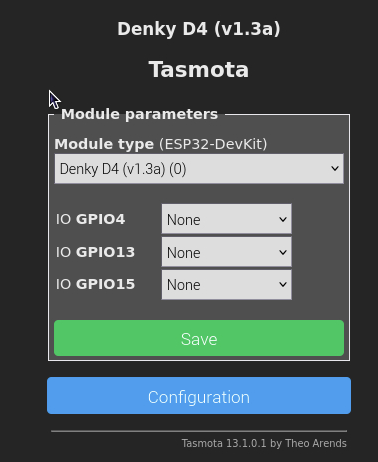
...et "Config Other"
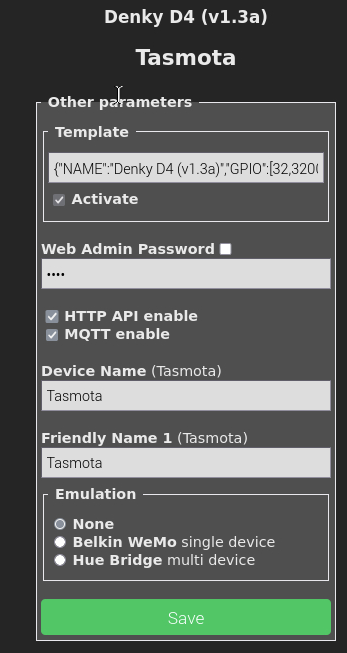
Tony
@ellipsis Tony,
il faut flasher le firmware de @Nicolas-Bernaerts c'est pour ça
cf https://community.ch2i.eu/topic/1450/procedure-de-flash-du-firmware-denky-d4
https://github.com/NicolasBernaerts/tasmota/tree/master/teleinfo
puis utiliser ce fichier
https://github.com/NicolasBernaerts/tasmota/blob/master/teleinfo/binary/tasmota32-teleinfo-denkyd4.bin -
@ellipsis Tony,
il faut flasher le firmware de @Nicolas-Bernaerts c'est pour çacf https://community.ch2i.eu/topic/1450/procedure-de-flash-du-firmware-denky-d4
https://github.com/NicolasBernaerts/tasmota/tree/master/teleinfo
puis utiliser ce fichier
https://github.com/NicolasBernaerts/tasmota/blob/master/teleinfo/binary/tasmota32-teleinfo-denkyd4.bin@Charles > J'ai flasher, en OTA, avec succes https://github.com/NicolasBernaerts/tasmota/raw/master/teleinfo/binary/tasmota32-teleinfo-denkyd4.bin.
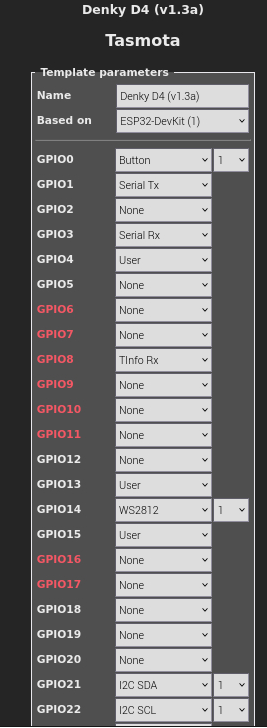
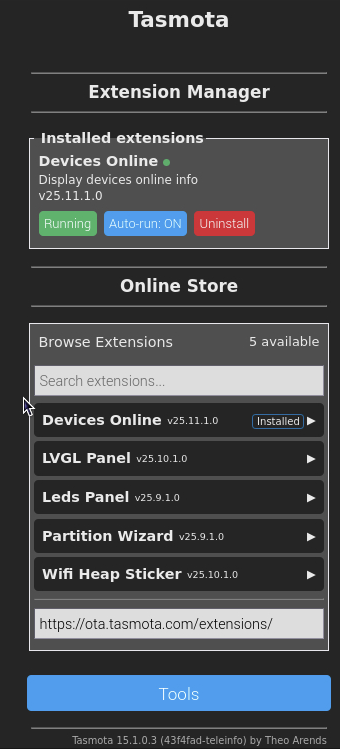
Mais tjrs pas de valeurs TIC
"Time": "2025-12-03T17:33:21",
"ENERGY": {
"TotalStartTime": "2025-11-28T12:26:41",
"Total": 0,
"Yesterday": 0,
"Today": 0,
"Period": 0,
"Power": 0,
"Current": 0
},
"TIC": {}
}En plus, ou bien la cause, je ne trouve pas comment acceder la page config Teleinfo?
Tony
-
@Charles > J'ai flasher, en OTA, avec succes https://github.com/NicolasBernaerts/tasmota/raw/master/teleinfo/binary/tasmota32-teleinfo-denkyd4.bin.
Mais tjrs pas de valeurs TIC
"Time": "2025-12-03T17:33:21",
"ENERGY": {
"TotalStartTime": "2025-11-28T12:26:41",
"Total": 0,
"Yesterday": 0,
"Today": 0,
"Period": 0,
"Power": 0,
"Current": 0
},
"TIC": {}
}En plus, ou bien la cause, je ne trouve pas comment acceder la page config Teleinfo?
Tony
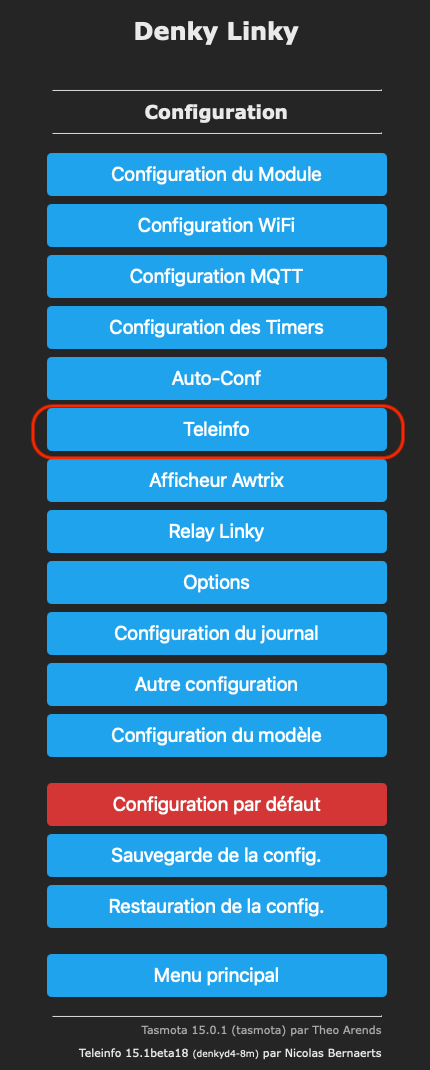
@ellipsis Menu Configuration puis téléinfo
mais moi en bas il m'indique que c'est la version de Nicolas, pas toi ? Jamais vu tes menus on line store, t'es certain d'avoir flashé la bonne version avec le bon processus ?
OTA : aller dans Firmware Upgrade puis cliquer sur le bouton Choisir un fichier et choisir le fichier telechargé, puis cliquer sur start upgrade
-
@ellipsis Tony,
il faut flasher le firmware de @Nicolas-Bernaerts c'est pour çacf https://community.ch2i.eu/topic/1450/procedure-de-flash-du-firmware-denky-d4
https://github.com/NicolasBernaerts/tasmota/tree/master/teleinfo
puis utiliser ce fichier
https://github.com/NicolasBernaerts/tasmota/blob/master/teleinfo/binary/tasmota32-teleinfo-denkyd4.bin@Charles Trouvé!
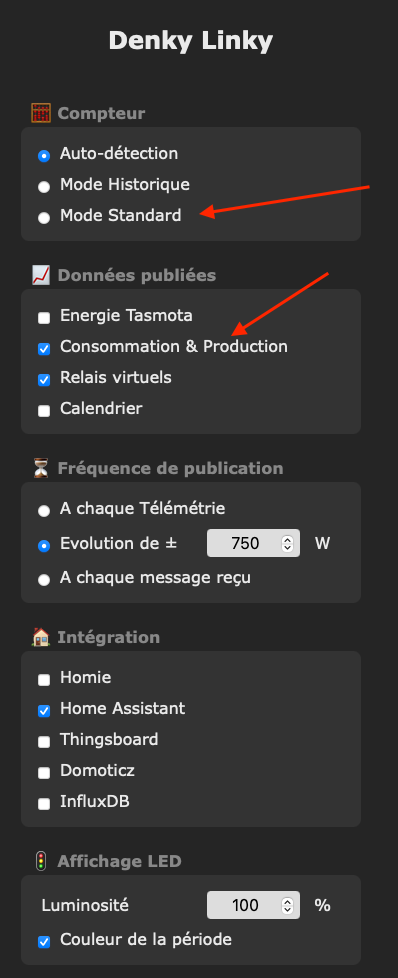
Je ne sais pas pourquoi, mais flasher sur FireFox (142.0.1 (aarch64, Raspberry pi) ne marche pas pour moi. Changer sur Chromium (Version 142.0.7444.175) et ca marche. Une fois terminé, Firefox peut gerer, a permiere vue, mais je reste sur Chromum our l'instant.
En passant, pour moi, le DNS semble figé sur Amazon US (16.100.251.63), et NTP sur ntp.org...
Charles, merci beaucoup pour l'assistance!
Tony


Hello! It looks like you're interested in this conversation, but you don't have an account yet.
Getting fed up of having to scroll through the same posts each visit? When you register for an account, you'll always come back to exactly where you were before, and choose to be notified of new replies (either via email, or push notification). You'll also be able to save bookmarks and upvote posts to show your appreciation to other community members.
With your input, this post could be even better 💗
Register Login