
WeMos Teleinfo Shield with ESPHome on ESP32-S2 mini - no data being received
-
Re: Wemos Teleinfo et ESP Home
I'm trying to get the Teleinfo data working with the Teleinfo shield on an ESP32-S2 mini using ESPHome for HomeAssistant integration. I've used some of the config in the linked topic and adapted it for my hardware.
My config looks like:
esphome:
  name: bosh
  friendly_name: bosh

esp32:
  board: lolin_s2_mini
  variant: esp32s2
  framework:
    type: esp-idf

# Enable logging
logger:
  level: DEBUG
  hardware_uart: UART1

# Enable Home Assistant API
api:
  encryption:
    key: "***"

ota:
  password: "***"

wifi:
  ssid: !secret wifi_ssid
  password: !secret wifi_password

  # Enable fallback hotspot (captive portal) in case wifi connection fails
  ap:
    ssid: "Bosh Fallback Hotspot"
    password: "***"

captive_portal:

uart:
  id: uart_bus
  rx_pin: GPIO11
  baud_rate: 1200
  parity: EVEN
  data_bits: 7

teleinfo:
  id: linky
  update_interval: 60s
  historical_mode: true

sensor:
  - platform: wifi_signal
    name: "WiFi Signal Sensor"
    update_interval: 60s
    unit_of_measurement: dB
    accuracy_decimals: 0
    force_update: false
    icon: mdi:wifi
  - platform: teleinfo
    tag_name: "IRMS1"
    name: "Current"
    unit_of_measurement: "A"
    icon: mdi:current-ac
    teleinfo_id: linky
  - platform: teleinfo
    tag_name: "URMS1"
    name: "Voltage"
    unit_of_measurement: "V"
    icon: mdi:current-ac
    teleinfo_id: linky
  - platform: teleinfo
    tag_name: "SINSTS"
    name: "Power"
    device_class: power
    unit_of_measurement: "VA"
    icon: mdi:flash
    teleinfo_id: linky
  - platform: teleinfo
    tag_name: "EASF01"
    name: "Off-peak hour consumption"
    unit_of_measurement: "kWh"
    accuracy_decimals: 3
    device_class: energy
    state_class: "total_increasing"
    icon: mdi:gauge
    teleinfo_id: linky
    id: heures_creuses
    filters:
      - multiply: 0.001
  - platform: teleinfo
    tag_name: "EASF02"
    name: "Peak hour consumption"
    unit_of_measurement: "kWh"
    accuracy_decimals: 3
    device_class: energy
    state_class: "total_increasing"
    icon: mdi:gauge
    teleinfo_id: linky
    id: heures_pleines
    filters:
      - multiply: 0.001
  - platform: teleinfo
    tag_name: "LTARF"
    name: "Current price"
    icon: mdi:clock-time-nine-outline
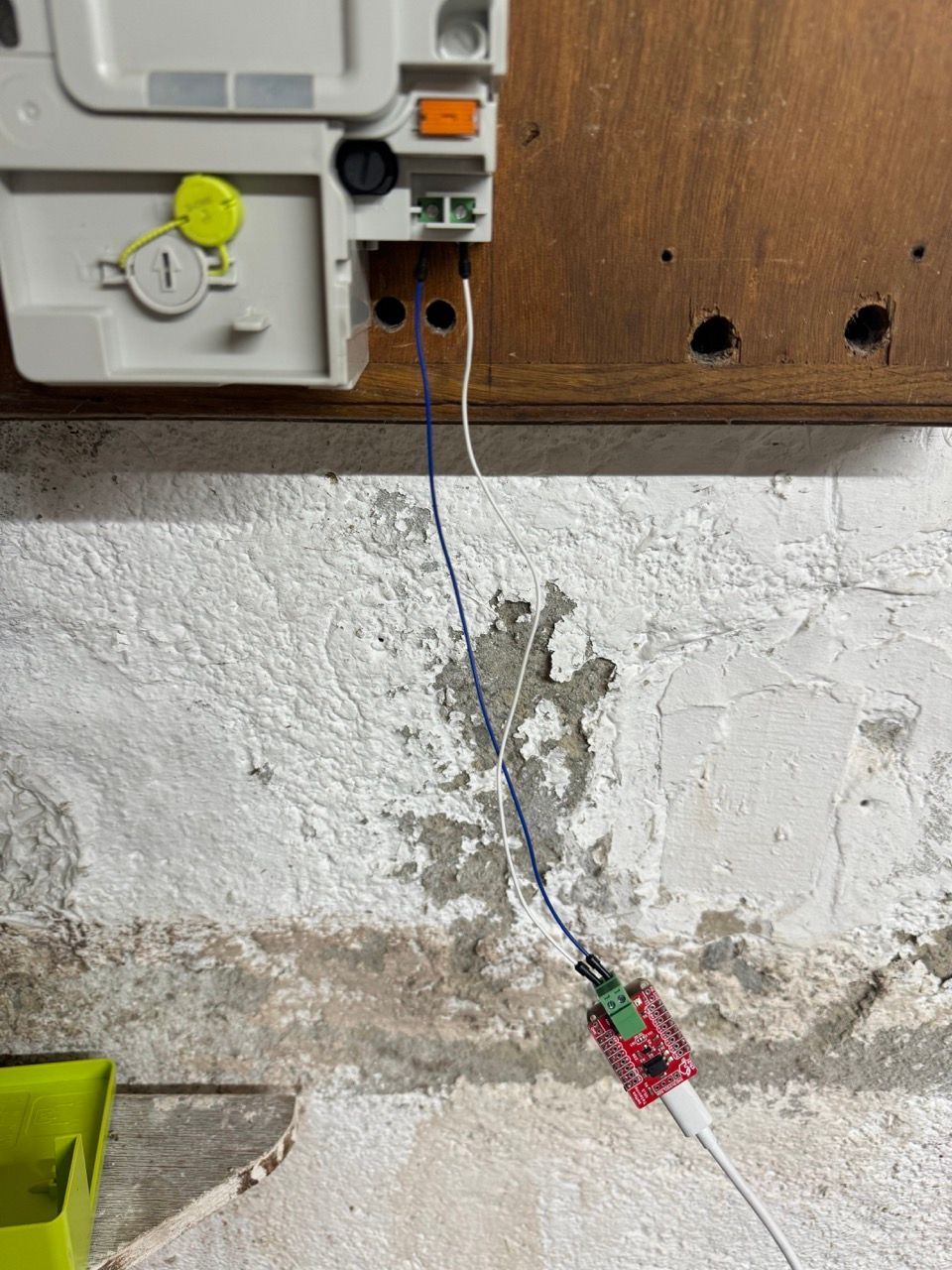
Here is a picture of the board connected to the Linky:
Everything compiles and installs correctly but it seems like no data is being received from teleinfo:
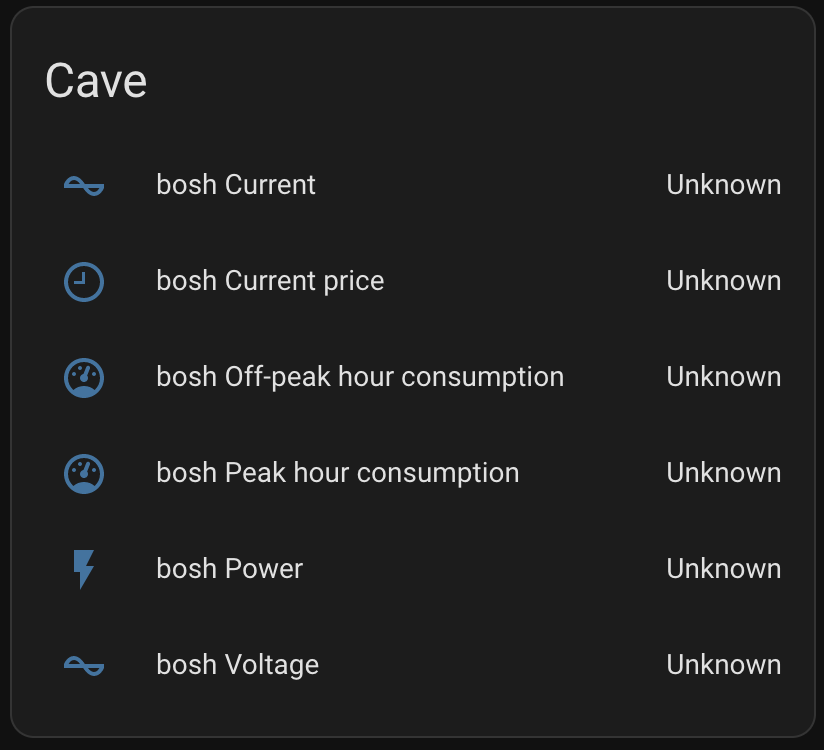
I've checked that my meter is set to "Historical mode" and the baud rate is correct.
I was not sure of which way round to connect the Linky to the Teleinfo shield, but I tried both ways and neither seems to work.
Logs from ESPHome:
[13:40:52][I][app:102]: ESPHome version 2024.2.0 compiled on Mar  4 2024, 10:26:21
[13:40:52][C][wifi:577]: WiFi:
[13:40:52][C][wifi:409]:   Local MAC: 80:65:99:E3:ED:BC
[13:40:52][C][wifi:414]:   SSID: [redacted]
[13:40:52][C][wifi:415]:   IP Address: 10.5.3.34
[13:40:52][C][wifi:417]:   BSSID: [redacted]
[13:40:52][C][wifi:418]:   Hostname: 'bosh'
[13:40:52][C][wifi:420]:   Signal strength: -77 dB ▂▄▆█
[13:40:52][C][wifi:424]:   Channel: 6
[13:40:52][C][wifi:425]:   Subnet: 255.255.255.0
[13:40:52][C][wifi:426]:   Gateway: 10.5.3.1
[13:40:52][C][wifi:427]:   DNS1: 10.5.3.1
[13:40:52][C][wifi:428]:   DNS2: 0.0.0.0
[13:40:52][C][logger:447]: Logger:
[13:40:52][C][logger:448]:   Level: DEBUG
[13:40:52][C][logger:449]:   Log Baud Rate: 115200
[13:40:52][C][logger:451]:   Hardware UART: UART1
[13:40:52][C][uart.idf:139]: UART Bus 0:
[13:40:52][C][uart.idf:141]:   RX Pin: GPIO11
[13:40:52][C][uart.idf:143]:   RX Buffer Size: 256
[13:40:52][C][uart.idf:145]:   Baud Rate: 1200 baud
[13:40:52][C][uart.idf:146]:   Data Bits: 7
[13:40:52][C][uart.idf:147]:   Parity: EVEN
[13:40:52][C][uart.idf:148]:   Stop bits: 1
[13:40:52][C][teleinfo:189]: TeleInfo:
[13:40:52][C][teleinfo_sensor:012]:   Teleinfo Sensor 'Current'
[13:40:52][C][teleinfo_sensor:012]:     State Class: ''
[13:40:52][C][teleinfo_sensor:012]:     Unit of Measurement: 'A'
[13:40:52][C][teleinfo_sensor:012]:     Accuracy Decimals: 0
[13:40:52][C][teleinfo_sensor:012]:     Icon: 'mdi:current-ac'
[13:40:52][C][teleinfo_sensor:012]:   Teleinfo Sensor 'Voltage'
[13:40:52][C][teleinfo_sensor:012]:     State Class: ''
[13:40:52][C][teleinfo_sensor:012]:     Unit of Measurement: 'V'
[13:40:52][C][teleinfo_sensor:012]:     Accuracy Decimals: 0
[13:40:52][C][teleinfo_sensor:012]:     Icon: 'mdi:current-ac'
[13:40:52][C][teleinfo_sensor:012]:   Teleinfo Sensor 'Power'
[13:40:52][C][teleinfo_sensor:012]:     Device Class: 'power'
[13:40:52][C][teleinfo_sensor:012]:     State Class: ''
[13:40:52][C][teleinfo_sensor:012]:     Unit of Measurement: 'VA'
[13:40:52][C][teleinfo_sensor:012]:     Accuracy Decimals: 0
[13:40:52][C][teleinfo_sensor:012]:     Icon: 'mdi:flash'
[13:40:52][C][teleinfo_sensor:012]:   Teleinfo Sensor 'Off-peak hour consumption'
[13:40:52][C][teleinfo_sensor:012]:     Device Class: 'energy'
[13:40:52][C][teleinfo_sensor:012]:     State Class: 'total_increasing'
[13:40:52][C][teleinfo_sensor:012]:     Unit of Measurement: 'kWh'
[13:40:52][C][teleinfo_sensor:012]:     Accuracy Decimals: 3
[13:40:52][C][teleinfo_sensor:012]:     Icon: 'mdi:gauge'
[13:40:52][C][teleinfo_sensor:012]:   Teleinfo Sensor 'Peak hour consumption'
[13:40:52][C][teleinfo_sensor:012]:     Device Class: 'energy'
[13:40:52][C][teleinfo_sensor:012]:     State Class: 'total_increasing'
[13:40:52][C][teleinfo_sensor:012]:     Unit of Measurement: 'kWh'
[13:40:52][C][teleinfo_sensor:012]:     Accuracy Decimals: 3
[13:40:52][C][teleinfo_sensor:012]:     Icon: 'mdi:gauge'
[13:40:52][C][teleinfo_sensor:012]:   Teleinfo Sensor 'Current price'
[13:40:52][C][teleinfo_sensor:012]:     State Class: ''
[13:40:52][C][teleinfo_sensor:012]:     Unit of Measurement: 'Wh'
[13:40:52][C][teleinfo_sensor:012]:     Accuracy Decimals: 0
[13:40:52][C][teleinfo_sensor:012]:     Icon: 'mdi:clock-time-nine-outline'
[13:40:52][C][captive_portal:088]: Captive Portal:
[13:40:52][C][mdns:115]: mDNS:
[13:40:52][C][mdns:116]:   Hostname: bosh
[13:40:52][C][ota:096]: Over-The-Air Updates:
[13:40:52][C][ota:097]:   Address: bosh.local:3232
[13:40:52][C][ota:100]:   Using Password.
[13:40:52][C][ota:103]:   OTA version: 2.
Any ideas how to debug this? I'm quite new to this kind of thing? @Charles do you have any ideas?
-
Re: Wemos Teleinfo et ESP Home
I'm trying to get the Teleinfo data working with the Teleinfo shield on an ESP32-S2 mini using ESPHome for HomeAssistant integration. I've used some of the config in the linked topic and adapted it for my hardware.
My config looks like:
esphome:
  name: bosh
  friendly_name: bosh

esp32:
  board: lolin_s2_mini
  variant: esp32s2
  framework:
    type: esp-idf

# Enable logging
logger:
  level: DEBUG
  hardware_uart: UART1

# Enable Home Assistant API
api:
  encryption:
    key: "***"

ota:
  password: "***"

wifi:
  ssid: !secret wifi_ssid
  password: !secret wifi_password

  # Enable fallback hotspot (captive portal) in case wifi connection fails
  ap:
    ssid: "Bosh Fallback Hotspot"
    password: "***"

captive_portal:

uart:
  id: uart_bus
  rx_pin: GPIO11
  baud_rate: 1200
  parity: EVEN
  data_bits: 7

teleinfo:
  id: linky
  update_interval: 60s
  historical_mode: true

sensor:
  - platform: wifi_signal
    name: "WiFi Signal Sensor"
    update_interval: 60s
    unit_of_measurement: dB
    accuracy_decimals: 0
    force_update: false
    icon: mdi:wifi
  - platform: teleinfo
    tag_name: "IRMS1"
    name: "Current"
    unit_of_measurement: "A"
    icon: mdi:current-ac
    teleinfo_id: linky
  - platform: teleinfo
    tag_name: "URMS1"
    name: "Voltage"
    unit_of_measurement: "V"
    icon: mdi:current-ac
    teleinfo_id: linky
  - platform: teleinfo
    tag_name: "SINSTS"
    name: "Power"
    device_class: power
    unit_of_measurement: "VA"
    icon: mdi:flash
    teleinfo_id: linky
  - platform: teleinfo
    tag_name: "EASF01"
    name: "Off-peak hour consumption"
    unit_of_measurement: "kWh"
    accuracy_decimals: 3
    device_class: energy
    state_class: "total_increasing"
    icon: mdi:gauge
    teleinfo_id: linky
    id: heures_creuses
    filters:
      - multiply: 0.001
  - platform: teleinfo
    tag_name: "EASF02"
    name: "Peak hour consumption"
    unit_of_measurement: "kWh"
    accuracy_decimals: 3
    device_class: energy
    state_class: "total_increasing"
    icon: mdi:gauge
    teleinfo_id: linky
    id: heures_pleines
    filters:
      - multiply: 0.001
  - platform: teleinfo
    tag_name: "LTARF"
    name: "Current price"
    icon: mdi:clock-time-nine-outline
Here is a picture of the board connected to the Linky:
Everything compiles and installs correctly but it seems like no data is being received from teleinfo:
I've checked that my meter is set to "Historical mode" and the baud rate is correct.
I was not sure of which way round to connect the Linky to the Teleinfo shield, but I tried both ways and neither seems to work.
Logs from ESPHome:
[13:40:52][I][app:102]: ESPHome version 2024.2.0 compiled on Mar  4 2024, 10:26:21
[13:40:52][C][wifi:577]: WiFi:
[13:40:52][C][wifi:409]:   Local MAC: 80:65:99:E3:ED:BC
[13:40:52][C][wifi:414]:   SSID: [redacted]
[13:40:52][C][wifi:415]:   IP Address: 10.5.3.34
[13:40:52][C][wifi:417]:   BSSID: [redacted]
[13:40:52][C][wifi:418]:   Hostname: 'bosh'
[13:40:52][C][wifi:420]:   Signal strength: -77 dB ▂▄▆█
[13:40:52][C][wifi:424]:   Channel: 6
[13:40:52][C][wifi:425]:   Subnet: 255.255.255.0
[13:40:52][C][wifi:426]:   Gateway: 10.5.3.1
[13:40:52][C][wifi:427]:   DNS1: 10.5.3.1
[13:40:52][C][wifi:428]:   DNS2: 0.0.0.0
[13:40:52][C][logger:447]: Logger:
[13:40:52][C][logger:448]:   Level: DEBUG
[13:40:52][C][logger:449]:   Log Baud Rate: 115200
[13:40:52][C][logger:451]:   Hardware UART: UART1
[13:40:52][C][uart.idf:139]: UART Bus 0:
[13:40:52][C][uart.idf:141]:   RX Pin: GPIO11
[13:40:52][C][uart.idf:143]:   RX Buffer Size: 256
[13:40:52][C][uart.idf:145]:   Baud Rate: 1200 baud
[13:40:52][C][uart.idf:146]:   Data Bits: 7
[13:40:52][C][uart.idf:147]:   Parity: EVEN
[13:40:52][C][uart.idf:148]:   Stop bits: 1
[13:40:52][C][teleinfo:189]: TeleInfo:
[13:40:52][C][teleinfo_sensor:012]:   Teleinfo Sensor 'Current'
[13:40:52][C][teleinfo_sensor:012]:     State Class: ''
[13:40:52][C][teleinfo_sensor:012]:     Unit of Measurement: 'A'
[13:40:52][C][teleinfo_sensor:012]:     Accuracy Decimals: 0
[13:40:52][C][teleinfo_sensor:012]:     Icon: 'mdi:current-ac'
[13:40:52][C][teleinfo_sensor:012]:   Teleinfo Sensor 'Voltage'
[13:40:52][C][teleinfo_sensor:012]:     State Class: ''
[13:40:52][C][teleinfo_sensor:012]:     Unit of Measurement: 'V'
[13:40:52][C][teleinfo_sensor:012]:     Accuracy Decimals: 0
[13:40:52][C][teleinfo_sensor:012]:     Icon: 'mdi:current-ac'
[13:40:52][C][teleinfo_sensor:012]:   Teleinfo Sensor 'Power'
[13:40:52][C][teleinfo_sensor:012]:     Device Class: 'power'
[13:40:52][C][teleinfo_sensor:012]:     State Class: ''
[13:40:52][C][teleinfo_sensor:012]:     Unit of Measurement: 'VA'
[13:40:52][C][teleinfo_sensor:012]:     Accuracy Decimals: 0
[13:40:52][C][teleinfo_sensor:012]:     Icon: 'mdi:flash'
[13:40:52][C][teleinfo_sensor:012]:   Teleinfo Sensor 'Off-peak hour consumption'
[13:40:52][C][teleinfo_sensor:012]:     Device Class: 'energy'
[13:40:52][C][teleinfo_sensor:012]:     State Class: 'total_increasing'
[13:40:52][C][teleinfo_sensor:012]:     Unit of Measurement: 'kWh'
[13:40:52][C][teleinfo_sensor:012]:     Accuracy Decimals: 3
[13:40:52][C][teleinfo_sensor:012]:     Icon: 'mdi:gauge'
[13:40:52][C][teleinfo_sensor:012]:   Teleinfo Sensor 'Peak hour consumption'
[13:40:52][C][teleinfo_sensor:012]:     Device Class: 'energy'
[13:40:52][C][teleinfo_sensor:012]:     State Class: 'total_increasing'
[13:40:52][C][teleinfo_sensor:012]:     Unit of Measurement: 'kWh'
[13:40:52][C][teleinfo_sensor:012]:     Accuracy Decimals: 3
[13:40:52][C][teleinfo_sensor:012]:     Icon: 'mdi:gauge'
[13:40:52][C][teleinfo_sensor:012]:   Teleinfo Sensor 'Current price'
[13:40:52][C][teleinfo_sensor:012]:     State Class: ''
[13:40:52][C][teleinfo_sensor:012]:     Unit of Measurement: 'Wh'
[13:40:52][C][teleinfo_sensor:012]:     Accuracy Decimals: 0
[13:40:52][C][teleinfo_sensor:012]:     Icon: 'mdi:clock-time-nine-outline'
[13:40:52][C][captive_portal:088]: Captive Portal:
[13:40:52][C][mdns:115]: mDNS:
[13:40:52][C][mdns:116]:   Hostname: bosh
[13:40:52][C][ota:096]: Over-The-Air Updates:
[13:40:52][C][ota:097]:   Address: bosh.local:3232
[13:40:52][C][ota:100]:   Using Password.
[13:40:52][C][ota:103]:   OTA version: 2.
Any ideas how to debug this? I'm quite new to this kind of thing? @Charles do you have any ideas?
OK it looks like I had connected the shield to the wrong terminals on the Linky. I reconnected to the I1 and I2 pins and the LED on the shield started blinking.
However I'm still not getting data in HomeAssistant.
The logs are now showing lines like the following:
[14:43:44][E][teleinfo:038]: bad crc: got 40 except 53
[14:44:44][E][teleinfo:038]: bad crc: got 66 except 89
[14:45:44][E][teleinfo:038]: bad crc: got 35 except 46
What does this mean ?
-
OK it looks like I had connected the shield to the wrong terminals on the Linky. I reconnected to the I1 and I2 pins and the LED on the shield started blinking.
However I'm still not getting data in HomeAssistant.
The logs are now showing lines like the following:
[14:43:44][E][teleinfo:038]: bad crc: got 40 except 53
[14:44:44][E][teleinfo:038]: bad crc: got 66 except 89
[14:45:44][E][teleinfo:038]: bad crc: got 35 except 46
What does this mean ?

Hello! It looks like you're interested in this conversation, but you don't have an account yet.
Getting fed up of having to scroll through the same posts each visit? When you register for an account, you'll always come back to exactly where you were before, and choose to be notified of new replies (either via email, or push notification). You'll also be able to save bookmarks and upvote posts to show your appreciation to other community members.
With your input, this post could be even better 💗
Register Login