
Question neophyte / Denky
-
Hi Charles (better to write in my native language, I guess)
I have 2 Linky in different properties in France, one 3-phase, one sigle phase. I have some capabilities in Raspberry Pi/Python/MQTT, and today I use clamps to measure electricity consumption. I want to move to Teleinfo for this data
I think I want to buy 2x Denky, but I wanted to confirm this option, if I may.
I assume I will set up each using the default software, and then examine development options to (in parallel?) send the data via MQTT to my own RPi4 Pi server.
Questions:- Deoes this make sense? Any suggestions?
- I've looked around and not found any details for the physical connection to the Linky units. I see the USB (and wire connectors) on the LInkys, but I'd quite like authoritative details. Can you point me to a source for this install info?
Thanks for any/all help!
-
Hi Charles (better to write in my native language, I guess)
I have 2 Linky in different properties in France, one 3-phase, one sigle phase. I have some capabilities in Raspberry Pi/Python/MQTT, and today I use clamps to measure electricity consumption. I want to move to Teleinfo for this data
I think I want to buy 2x Denky, but I wanted to confirm this option, if I may.
I assume I will set up each using the default software, and then examine development options to (in parallel?) send the data via MQTT to my own RPi4 Pi server.
Questions:- Deoes this make sense? Any suggestions?
- I've looked around and not found any details for the physical connection to the Linky units. I see the USB (and wire connectors) on the LInkys, but I'd quite like authoritative details. Can you point me to a source for this install info?
Thanks for any/all help!
@ellipsis this is the correct way, you have 2 options, if your place has internet may be centralizing data thru a clouded MQTT or hosted on a PI in your main house or cloud is ideal, if not you'll need a PI in each place to centralize.
Denky D4 need to be connected with a USB-C cable to bring power to the module, then 2 wires from green connector, one in the Linky I1 and other I2 (no mater order, it's not polarized) for Teleinfo Signal.
Hope this helps
-
@ellipsis this is the correct way, you have 2 options, if your place has internet may be centralizing data thru a clouded MQTT or hosted on a PI in your main house or cloud is ideal, if not you'll need a PI in each place to centralize.
Denky D4 need to be connected with a USB-C cable to bring power to the module, then 2 wires from green connector, one in the Linky I1 and other I2 (no mater order, it's not polarized) for Teleinfo Signal.
Hope this helps
-
@Charles Thanks for confirming - will order asap.
FYI, there is a broken link you may want to fix... https://github.com/hallard/LibTeleinfo/blob/master/examples/Raspberry_JSON/Raspberry_JSON.ino
Thanks!
-
@Charles Hellon again. I received and connected a Denky D4 unit to my pi4 and 3-phase meter (flashing blue LED, so I assume correctly).
I'm struggling to make the software connections work. I think this is because I have not found the correct instructions document for installation, so I'm blundering around somewhat.Current symptom: cannot see tty connection with picocom.
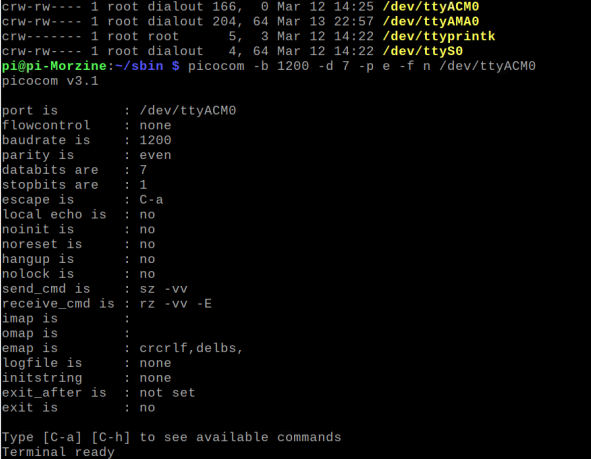
Serial port is enabled, serial console disabled, cmdline.txt is as follows:
console=tty1 root=PARTUUID=252dbefd-02 rootfstype=ext4 fsck.repair=yes rootwait quiet splash plymouth.ignore-serial-consolesdmesg seems fine:
[ 2.577377] usb 1-1.4: New USB device found, idVendor=1a86, idProduct=55d4, bcdDevice= 4.43
[ 2.577414] usb 1-1.4: New USB device strings: Mfr=0, Product=2, SerialNumber=3
[ 2.577435] usb 1-1.4: Product: USB Single Serial
[ 2.577453] usb 1-1.4: SerialNumber: 54AD000834Thanks for any help
-
@Charles Hellon again. I received and connected a Denky D4 unit to my pi4 and 3-phase meter (flashing blue LED, so I assume correctly).
I'm struggling to make the software connections work. I think this is because I have not found the correct instructions document for installation, so I'm blundering around somewhat.Current symptom: cannot see tty connection with picocom.
Serial port is enabled, serial console disabled, cmdline.txt is as follows:
console=tty1 root=PARTUUID=252dbefd-02 rootfstype=ext4 fsck.repair=yes rootwait quiet splash plymouth.ignore-serial-consolesdmesg seems fine:
[ 2.577377] usb 1-1.4: New USB device found, idVendor=1a86, idProduct=55d4, bcdDevice= 4.43
[ 2.577414] usb 1-1.4: New USB device strings: Mfr=0, Product=2, SerialNumber=3
[ 2.577435] usb 1-1.4: Product: USB Single Serial
[ 2.577453] usb 1-1.4: SerialNumber: 54AD000834Thanks for any help
@ellipsis sorry about that, I though you wanted Denky to communicate thru PI using WiFi (both on same network) and sending data to PI MQTT broker using the network.
To have the linky physically connected to PI you should have used PITinfo (PI Connector) or MicroTeleinfo (USB). MicroTeleinfo is better if you want to connect several dongle to same PI (up to 4 USB)Anyway you can use Denky D4 to do the same thing but it's a little overkill, you can try to flash some sample to read teleinfo from denky and send thru Serial.
https://github.com/hallard/LibTeleinfo/tree/master/examples/Teleinfo_DenkyD4Check ou samples Teleinfo_DenkyD4 or ESP32_Passthru (this one more like MicroTeleinfo or PiTinfo)
But I repeat easier and fasted way is to connect Denky D4 with WiFi and Tasmota firmware and then send data to MQTT.
You can also set picocom to 115200 (to see tasmota log and extract ENERGY frame data)
-
@ellipsis sorry about that, I though you wanted Denky to communicate thru PI using WiFi (both on same network) and sending data to PI MQTT broker using the network.
To have the linky physically connected to PI you should have used PITinfo (PI Connector) or MicroTeleinfo (USB). MicroTeleinfo is better if you want to connect several dongle to same PI (up to 4 USB)Anyway you can use Denky D4 to do the same thing but it's a little overkill, you can try to flash some sample to read teleinfo from denky and send thru Serial.
https://github.com/hallard/LibTeleinfo/tree/master/examples/Teleinfo_DenkyD4Check ou samples Teleinfo_DenkyD4 or ESP32_Passthru (this one more like MicroTeleinfo or PiTinfo)
But I repeat easier and fasted way is to connect Denky D4 with WiFi and Tasmota firmware and then send data to MQTT.
You can also set picocom to 115200 (to see tasmota log and extract ENERGY frame data)
-
@Charles My misunderstanding. Will pursue Tasmota/MQTT option. Thanks very much for your help here!
Tony@ellipsis Making progress on this, but I should have asked where is the best document or link for installation of Denky 4 with Raspberry Pi? I see many fragments on various sites, but cannot find an up to date document. English or French are fine for me.
Thanks again

Hello! It looks like you're interested in this conversation, but you don't have an account yet.
Getting fed up of having to scroll through the same posts each visit? When you register for an account, you'll always come back to exactly where you were before, and choose to be notified of new replies (either via email, or push notification). You'll also be able to save bookmarks and upvote posts to show your appreciation to other community members.
With your input, this post could be even better 💗
Register Login