
teleinfo data interval inconsistent
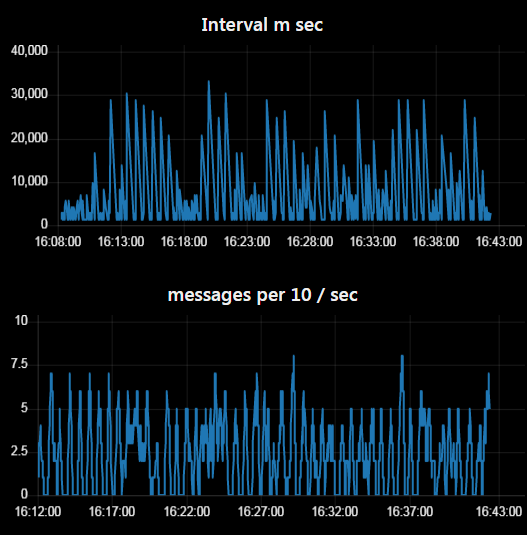
-
Dmitry
I suspect you're using ESP8266 with custom firmware correct? In all case we don't use ESP8266 anymore due to this kind of issues and software serial doesn't help.
If you want to keep ESP8266, why not giving a try to latest tasmota firmware just to see if it's works better? It's less than 5 min to give a try:
- Flash using webtool selecting
tasmota teleinfo - Once flashed connect to new tasmota access point to configure your WiFi credentials
- Setup MQTT
- If Using WeMos Teleinfo apply template
{"NAME":"Wemos Teleinfo","GPIO":[1,1,1,1,1,1,1,1,1,1,1,1,1,1,1376,1,1,640,608,5632,1,1,0,1,0,0,0,1,1,1,1,1,1,1,1,1],"FLAG":0,"BASE":1} - Then go to console to configure teleinfo as follow
EnergyConfig Standard
EnergyConfig Changed
MQTT will publish each time a value is changed in the teleinfo Frame (such as
PAPP)Once again using ESP32, gives you more control with autoconfig mode, SSL and full berry language to manipulate data as you wish without doing any compile/flash anymore, check the github documenation you'll have some berry example, exactly what you need.
- Flash using webtool selecting
-
Dmitry
I suspect you're using ESP8266 with custom firmware correct? In all case we don't use ESP8266 anymore due to this kind of issues and software serial doesn't help.
If you want to keep ESP8266, why not giving a try to latest tasmota firmware just to see if it's works better? It's less than 5 min to give a try:
- Flash using webtool selecting
tasmota teleinfo - Once flashed connect to new tasmota access point to configure your WiFi credentials
- Setup MQTT
- If Using WeMos Teleinfo apply template
{"NAME":"Wemos Teleinfo","GPIO":[1,1,1,1,1,1,1,1,1,1,1,1,1,1,1376,1,1,640,608,5632,1,1,0,1,0,0,0,1,1,1,1,1,1,1,1,1],"FLAG":0,"BASE":1} - Then go to console to configure teleinfo as follow
EnergyConfig Standard
EnergyConfig Changed
MQTT will publish each time a value is changed in the teleinfo Frame (such as
PAPP)Once again using ESP32, gives you more control with autoconfig mode, SSL and full berry language to manipulate data as you wish without doing any compile/flash anymore, check the github documenation you'll have some berry example, exactly what you need.
@charles Thanks. I will try that.
I did not know that esp8266 has this limitations. I should have just soldered the esp32 board to the shield that I bought from you. - Flash using webtool selecting
-
@charles Thanks. I will try that.
I did not know that esp8266 has this limitations. I should have just soldered the esp32 board to the shield that I bought from you.@dmitry-korzhenevskiy if you have ESP8266 connected to WeMos Shield (Assuming it's D1 Mini) Serial is on GPIO13 and you can use Hardware Serial with your own code just using a
serial.swap()after init of the serial in your code. Should also help to solve softserial issues. -
@dmitry-korzhenevskiy if you have ESP8266 connected to WeMos Shield (Assuming it's D1 Mini) Serial is on GPIO13 and you can use Hardware Serial with your own code just using a
serial.swap()after init of the serial in your code. Should also help to solve softserial issues.@charles Yes, I use gpio13 like so:
SoftwareSerial serialsoft1(13, 12); // Teleinfo SerialMy setup contains
void setup(void)
{
Serial.begin(115200);
serialsoft1.begin(1200);
tinfo.init();
Serial.swap();
tinfo.attachData(print_values);
Serial.println(F("Teleinfo started"));
}
Now after I added the swap() it stopped receiving anything on that port. It senses no teleinfo data. swap is some kind of magic

-
@charles Yes, I use gpio13 like so:
SoftwareSerial serialsoft1(13, 12); // Teleinfo SerialMy setup contains
void setup(void)
{
Serial.begin(115200);
serialsoft1.begin(1200);
tinfo.init();
Serial.swap();
tinfo.attachData(print_values);
Serial.println(F("Teleinfo started"));
}
Now after I added the swap() it stopped receiving anything on that port. It senses no teleinfo data. swap is some kind of magic
@dmitry-korzhenevskiy this is a normal behavior, you are mixing software serial and hardware one on same pins, it can't works properly
Serial.swap()swap pin of hardware Serial (GPIO13 instead of GPIO3)The deal with ESP8266, if you use hardware serial, no way to serial debug, this is exactly why I don't like this kind of custom configuration, you're blind in case of issues except trying software serial to debug using something like that
// instantiate SoftSerial but not using pin now // Debug Soft Serial, no RX TX for now SoftwareSerial SerialDebug(-1, -1); void setup(void) { // Hardware Serial (GPIO1/GPIO3) Serial.begin(1200); // Now Free up Pins used by Hardware Serial to GPIO15/GPIO13 Serial.swap(); // Now we can setup soft Serial with GPIO1 for TX SerialDebug.setTransmitEnablePin(1); SerialDebug.begin(9600); SerialDebug.println(F("Soft Serial started")); tinfo.init(); tinfo.attachData(print_values); SerialDebug.println(F("Teleinfo started")); } -
@dmitry-korzhenevskiy this is a normal behavior, you are mixing software serial and hardware one on same pins, it can't works properly
Serial.swap()swap pin of hardware Serial (GPIO13 instead of GPIO3)The deal with ESP8266, if you use hardware serial, no way to serial debug, this is exactly why I don't like this kind of custom configuration, you're blind in case of issues except trying software serial to debug using something like that
// instantiate SoftSerial but not using pin now // Debug Soft Serial, no RX TX for now SoftwareSerial SerialDebug(-1, -1); void setup(void) { // Hardware Serial (GPIO1/GPIO3) Serial.begin(1200); // Now Free up Pins used by Hardware Serial to GPIO15/GPIO13 Serial.swap(); // Now we can setup soft Serial with GPIO1 for TX SerialDebug.setTransmitEnablePin(1); SerialDebug.begin(9600); SerialDebug.println(F("Soft Serial started")); tinfo.init(); tinfo.attachData(print_values); SerialDebug.println(F("Teleinfo started")); }@charles I tried serial.swap . It worked! But it works pretty much the same way as before serial.swap. Still the interval between updates is reaching 10-20 seconds sometimes.
I also tried making tasmota teleinfo as you described previously. I applied the template
{"NAME":"Wemos Teleinfo","GPIO":[1,1,1,1,640,608,1,1,1,5152,1376,1,1,1],"FLAG":0,"BASE":18}(The one that you wrote in previous message is for esp32)
and put in two command into console.14:09:57.984 CMD: EnergyConfig Changed 14:09:57.987 TIC: Raw to 'changed' 14:09:57.991 MQT: tic/RESULT = {"EnergyConfig":"Done"}I can change the RGB led via the web interface,
I see that it is connected to mqtt but is sends no data to specified topic. and the web interface show this
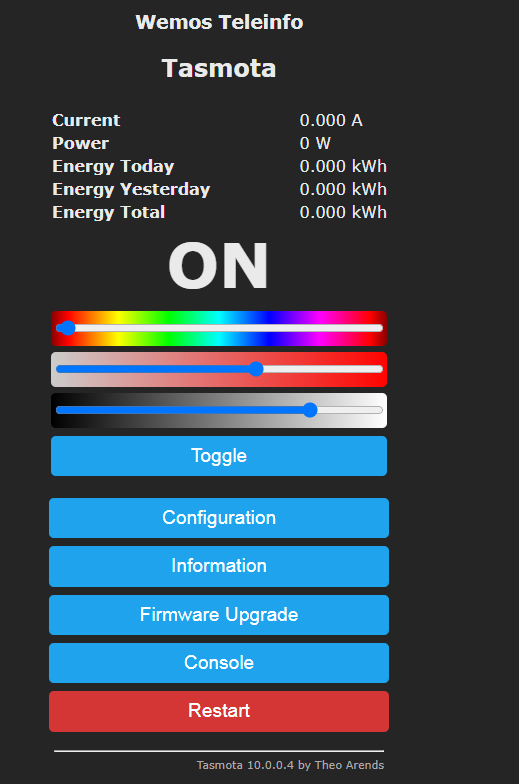
Probably resoldering the shield to esp32 board is the simplest solution.
-
@charles I tried serial.swap . It worked! But it works pretty much the same way as before serial.swap. Still the interval between updates is reaching 10-20 seconds sometimes.
I also tried making tasmota teleinfo as you described previously. I applied the template
{"NAME":"Wemos Teleinfo","GPIO":[1,1,1,1,640,608,1,1,1,5152,1376,1,1,1],"FLAG":0,"BASE":18}(The one that you wrote in previous message is for esp32)
and put in two command into console.14:09:57.984 CMD: EnergyConfig Changed 14:09:57.987 TIC: Raw to 'changed' 14:09:57.991 MQT: tic/RESULT = {"EnergyConfig":"Done"}I can change the RGB led via the web interface,
I see that it is connected to mqtt but is sends no data to specified topic. and the web interface show this
Probably resoldering the shield to esp32 board is the simplest solution.
@dmitry-korzhenevskiy if you don't have other value on tasmota web interface, this mean that teleinfo was not detected, are you sure (check in template menu) that Tinfo RX pin is on GPIO13 (template should have set it) ?
Could you post a picture of your WeMos and Shield Assembly?
Just flashed WeMos D1 Mini from scratch (full flash erase before) with latest tasmota. Reset, connected to AP, then connected tasmota to my WiFi and applied template you mention earlier, that's it.
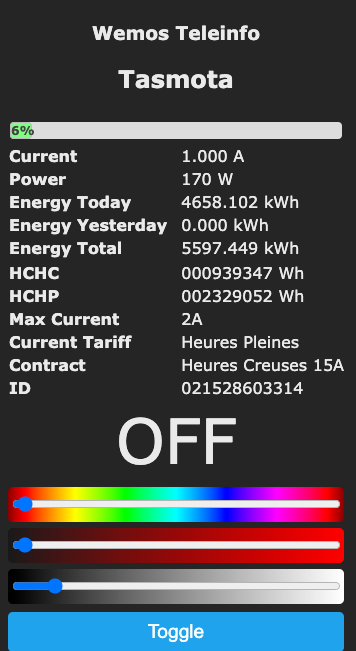
Are you sure of your connexion on teleinfo and connectors correctly soldered on WeMos Teleinfo Shield? Check Also on smartmeter connexion I already had some issue due to bad connectivity.
-
@dmitry-korzhenevskiy if you don't have other value on tasmota web interface, this mean that teleinfo was not detected, are you sure (check in template menu) that Tinfo RX pin is on GPIO13 (template should have set it) ?
Could you post a picture of your WeMos and Shield Assembly?
Just flashed WeMos D1 Mini from scratch (full flash erase before) with latest tasmota. Reset, connected to AP, then connected tasmota to my WiFi and applied template you mention earlier, that's it.
Are you sure of your connexion on teleinfo and connectors correctly soldered on WeMos Teleinfo Shield? Check Also on smartmeter connexion I already had some issue due to bad connectivity.
@charles I am sure the connection is ok you don't need to see the assembly. because it worked 1 hour before with serial.swap and I did not change anything apart from the software. The red light that indicated the TIC serial activity is flashing as before.
"that Tinfo RX pin is on GPIO13 (template should have set it) ?" - Yes the 13 is set to tinfo rx. In my custom arduino software I used
SoftwareSerial serialsoft1(13, 12);And it worked. So it is fine with connection on 13.
I don't want to waste any of your time. I will do it again with esp32, it should work better.
-
@charles I am sure the connection is ok you don't need to see the assembly. because it worked 1 hour before with serial.swap and I did not change anything apart from the software. The red light that indicated the TIC serial activity is flashing as before.
"that Tinfo RX pin is on GPIO13 (template should have set it) ?" - Yes the 13 is set to tinfo rx. In my custom arduino software I used
SoftwareSerial serialsoft1(13, 12);And it worked. So it is fine with connection on 13.
I don't want to waste any of your time. I will do it again with esp32, it should work better.
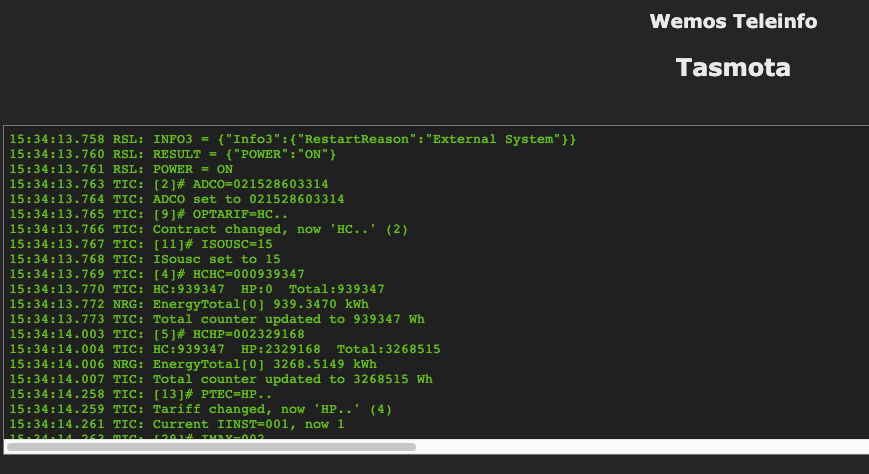
@dmitry-korzhenevskiy With Tasmota it should works right out of the box. Did you configured the teleinfo mode to your mode?
I mean with optionEnergyConfig Historique(1200 this is the default) orEnergyConfig Standard(Linky standard 9600)?With ESP32 we'll have more debug info, for now you can setup weblog to Full Debug an look in the console on boot and see interesting things
-
@dmitry-korzhenevskiy With Tasmota it should works right out of the box. Did you configured the teleinfo mode to your mode?
I mean with optionEnergyConfig Historique(1200 this is the default) orEnergyConfig Standard(Linky standard 9600)?With ESP32 we'll have more debug info, for now you can setup weblog to Full Debug an look in the console on boot and see interesting things
@charles
I think I found the solution. I needed to enter two linesEnergyConfig Historique
EnergyConfig fullNow the updates are consistent.
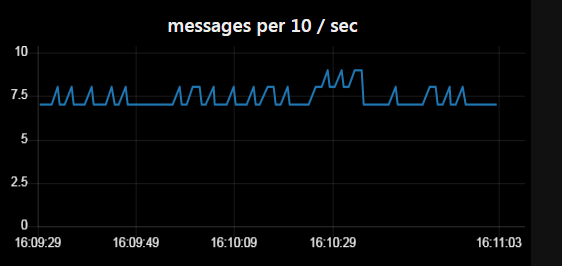
Now I have PAPP update every 1.4 s.
Tasmota works much better than custom arduino program using the library. Even on softserial with esp8266.
Thanks
The problem solved. -
@charles
I think I found the solution. I needed to enter two linesEnergyConfig Historique
EnergyConfig fullNow the updates are consistent.
Now I have PAPP update every 1.4 s.
Tasmota works much better than custom arduino program using the library. Even on softserial with esp8266.
Thanks
The problem solved.@dmitry-korzhenevskiy Nice it's solved, and yes Tasmota rocks


Hello! It looks like you're interested in this conversation, but you don't have an account yet.
Getting fed up of having to scroll through the same posts each visit? When you register for an account, you'll always come back to exactly where you were before, and choose to be notified of new replies (either via email, or push notification). You'll also be able to save bookmarks and upvote posts to show your appreciation to other community members.
With your input, this post could be even better 💗
Register Login