Skip to content
  • Blog
  • Categories
  • Recent
  • Tags
  • Popular
  • Users
  • Groups
Skins
  • Light
  • Brite
  • Cerulean
  • Cosmo
  • Flatly
  • Journal
  • Litera
  • Lumen
  • Lux
  • Materia
  • Minty
  • Morph
  • Pulse
  • Sandstone
  • Simplex
  • Sketchy
  • Spacelab
  • United
  • Yeti
  • Zephyr
  • Dark
  • Cyborg
  • Darkly
  • Quartz
  • Slate
  • Solar
  • Superhero
  • Vapor

  • Default (No Skin)
  • No Skin
Collapse
Brand Logo

Community Forum

  1. Home
  2. Categories
  3. Téléinfo
  4. PiTInfo
  5. Plantage raspi au branchement PiTinfo

Plantage raspi au branchement PiTinfo

Scheduled Pinned Locked Moved PiTInfo
plantagebugraspberrypitinfoshutdown
16 Posts 2 Posters 3.7k Views 2 Watching
  • Oldest to Newest
  • Newest to Oldest
  • Most Votes
Reply
  • Reply as topic
Log in to reply
This topic has been deleted. Only users with topic management privileges can see it.
  • sergentdu57S Offline
    sergentdu57S Offline
    sergentdu57
    wrote on last edited by sergentdu57
    #1

    Bonjour,
    J'ai dernièrement acquis un module PiTinfo afin de relever les informations de mon linky via un raspbery pi 3B.
    J'ai suivi les articles pour remapper le port série sans problème.
    Mais lorsque je branche la carte (avec ou sans linky raccordé), l'os du raspbery ne démarre pas ou plante si la connexion se fait raspi en marche.

    Quelqu'un aurait-il une idée ?

    Merci d'avance

    1 Reply Last reply
    • CharlesC Offline
      CharlesC Offline
      Charles
      wrote on last edited by
      #2

      Peux tu poster une photo de ton branchement ?

      1 Reply Last reply
      • sergentdu57S Offline
        sergentdu57S Offline
        sergentdu57
        wrote on last edited by
        #3

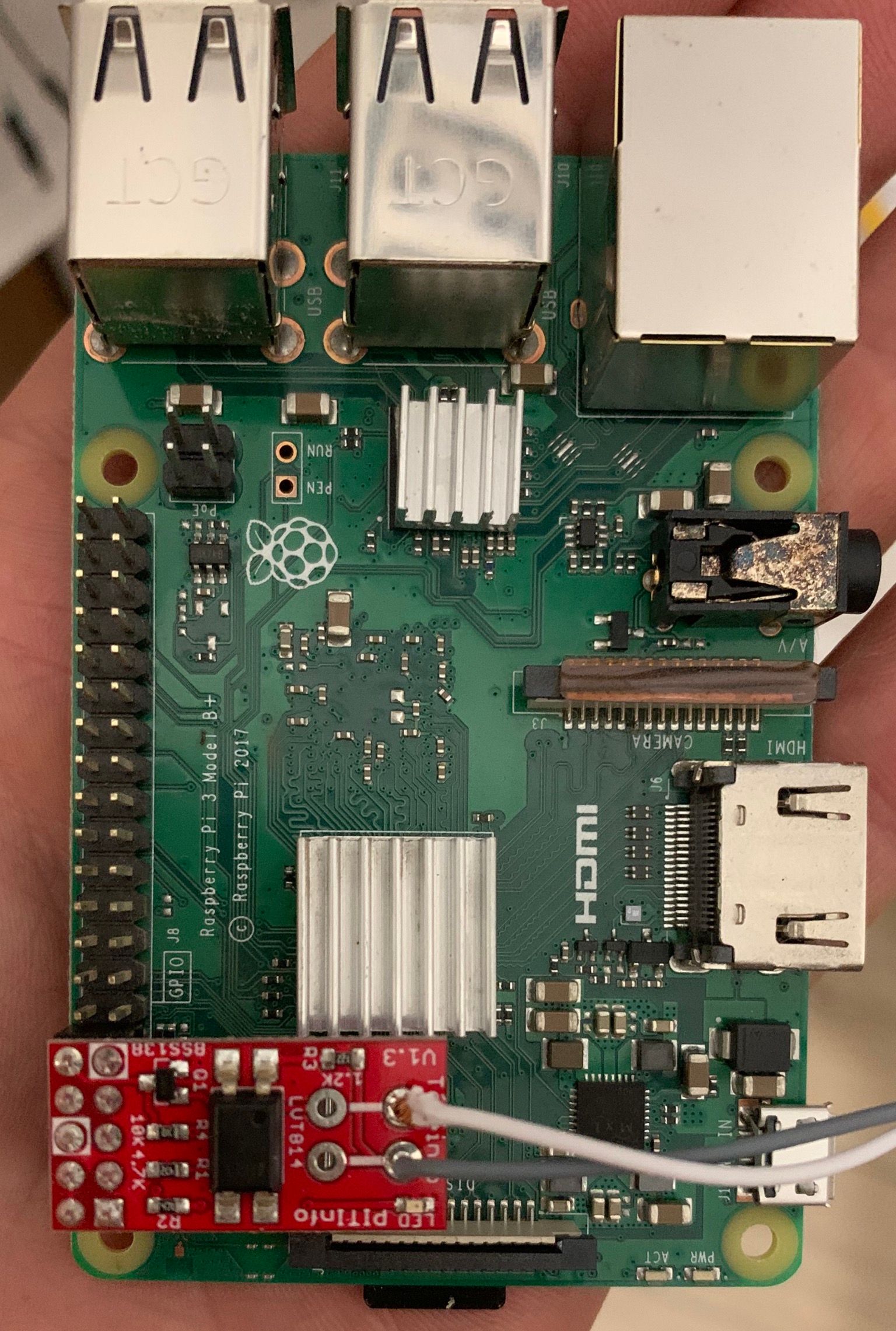
        Voici le branchement.
        D'habitude le raspi est dans une boîte ventilé et le module PiTinfo sera branché sur une nappe.
        36E9CA29-95DC-413A-BDDB-02825933483F.jpeg

        1 Reply Last reply
        • CharlesC Offline
          CharlesC Offline
          Charles
          wrote on last edited by Charles
          #4

          le branchement semble correct

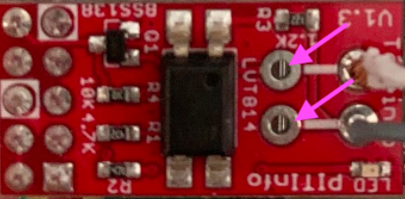
          mais c'est quoi dessous ici ?

          5e5969cc-aef2-430f-9272-383199518c4f-image.png

          1 Reply Last reply
          • sergentdu57S Offline
            sergentdu57S Offline
            sergentdu57
            wrote on last edited by
            #5

            Il s'agit d'un processeur de la carte mère du Raspbery, mais il n'est pas en contact avec l'autre face du PiTinfo. Il reste environ 1cm entre les deux.

            1 Reply Last reply
            • CharlesC Offline
              CharlesC Offline
              Charles
              wrote on last edited by
              #6

              Je parlais des 2 pins entrantes (son soudées) dans les trous du PI Téléinfo indiqué par les flêches.

              Comme tu as soudés les fils je ne vois pas bien ce que ça fait, là j'essaie juste de comprendre.

              1 Reply Last reply
              • sergentdu57S Offline
                sergentdu57S Offline
                sergentdu57
                wrote on last edited by
                #7

                Oui justement, rien n'est soudé entre ces deux bornes, on voit une partie d'un processeur raspbery à travers les perçage.
                Les deux fils (blanc et gris) soudés sont prévu pour le raccordement à la prise TIC du linky, mais sont actuellement isolé.

                1 Reply Last reply
                • CharlesC Offline
                  CharlesC Offline
                  Charles
                  wrote on last edited by
                  #8

                  C'est curieux.

                  Qd tu mets la carte le PI ne démarre pas c'est bien ça ? Si oui peux tu mettre la carte sans brancher la téléinfo ?

                  1 Reply Last reply
                  • sergentdu57S Offline
                    sergentdu57S Offline
                    sergentdu57
                    wrote on last edited by
                    #9

                    La led du raspi s'allume, mais impossible de se connecter en SSH ou Apache.
                    Je retire le module PiTinfo et le raspi devient accessible à nouveau au bout d'une vingtaine de seconde.
                    Je rebranche le PiTinfo, le SSH commence à ramer puis plus de connexion à nouveau.
                    Je retire le module ça revient, etc...
                    J'ai testé avec et sans la télé info, c'est pareil.

                    1 Reply Last reply
                    • CharlesC Offline
                      CharlesC Offline
                      Charles
                      wrote on last edited by Charles
                      #10

                      tu peux faire un

                      cat /boot/cmdline.txt
                      puis
                      cat /boot/config.txt

                      et poster le résultat stp.

                      root@pi03(ro):~# cat /boot/cmdline.txt 
                      
                      dwc_otg.lpm_enable=0 console=tty1 root=/dev/mmcblk0p2 rootfstype=ext4 elevator=deadline fsck.repair=yes rootwait fastboot noswap ro
                      
                      
                      root@pi03(ro):~# cat /boot/config.txt 
                      
                      #uncomment to overclock the arm. 700 MHz is the default.
                      #arm_freq=800
                      
                      # enable the optional hardware interfaces
                      dtparam=i2c_arm=on
                      dtparam=spi=on
                      
                      # enable real serial 
                      dtoverlay=pi3-miniuart-bt
                      
                      # Enable audio (loads snd_bcm2835)
                      dtparam=audio=on
                      gpu_mem=16
                      enable_uart=1
                      
                      
                      1 Reply Last reply
                      • sergentdu57S Offline
                        sergentdu57S Offline
                        sergentdu57
                        wrote on last edited by
                        #11
                        pi@raspberrypi:~ $ cat /boot/cmdline.txt
                        
                        pi@raspberrypi:~ $ cat /boot/config.txt
                        # For more options and information see
                        # http://rpf.io/configtxt
                        # Some settings may impact device functionality. See link above for details
                        
                        # uncomment if you get no picture on HDMI for a default "safe" mode
                        #hdmi_safe=1
                        
                        # uncomment this if your display has a black border of unused pixels visible
                        # and your display can output without overscan
                        #disable_overscan=1
                        
                        # uncomment the following to adjust overscan. Use positive numbers if console
                        # goes off screen, and negative if there is too much border
                        #overscan_left=16
                        #overscan_right=16
                        #overscan_top=16
                        #overscan_bottom=16
                        
                        # uncomment to force a console size. By default it will be display's size minus
                        # overscan.
                        #framebuffer_width=1280
                        #framebuffer_height=720
                        
                        # uncomment if hdmi display is not detected and composite is being output
                        #hdmi_force_hotplug=1
                        
                        # uncomment to force a specific HDMI mode (this will force VGA)
                        #hdmi_group=1
                        #hdmi_mode=1
                        
                        # uncomment to force a HDMI mode rather than DVI. This can make audio work in
                        # DMT (computer monitor) modes
                        #hdmi_drive=2
                        
                        # uncomment to increase signal to HDMI, if you have interference, blanking, or
                        # no display
                        #config_hdmi_boost=4
                        
                        # uncomment for composite PAL
                        #sdtv_mode=2
                        
                        #uncomment to overclock the arm. 700 MHz is the default.
                        #arm_freq=800
                        
                        # Uncomment some or all of these to enable the optional hardware interfaces
                        #dtparam=i2c_arm=on
                        #dtparam=i2s=on
                        #dtparam=spi=on
                        
                        # Uncomment this to enable infrared communication.
                        #dtoverlay=gpio-ir,gpio_pin=17
                        #dtoverlay=gpio-ir-tx,gpio_pin=18
                        
                        # Additional overlays and parameters are documented /boot/overlays/README
                        
                        # Enable audio (loads snd_bcm2835)
                        dtparam=audio=on
                        
                        [pi4]
                        # Enable DRM VC4 V3D driver on top of the dispmanx display stack
                        dtoverlay=vc4-fkms-v3d
                        max_framebuffers=2
                        
                        [all]
                        #dtoverlay=vc4-fkms-v3d
                        enable_uart=1
                        
                        # Disable bluetooth
                        dtoverlay=pi3-miniuart-bt
                        #dtoverlay=pi3-disable-bt
                        dtoverlay=w1-gpio
                        
                        
                        CharlesC 1 Reply Last reply
                        • sergentdu57S sergentdu57
                          pi@raspberrypi:~ $ cat /boot/cmdline.txt
                          
                          pi@raspberrypi:~ $ cat /boot/config.txt
                          # For more options and information see
                          # http://rpf.io/configtxt
                          # Some settings may impact device functionality. See link above for details
                          
                          # uncomment if you get no picture on HDMI for a default "safe" mode
                          #hdmi_safe=1
                          
                          # uncomment this if your display has a black border of unused pixels visible
                          # and your display can output without overscan
                          #disable_overscan=1
                          
                          # uncomment the following to adjust overscan. Use positive numbers if console
                          # goes off screen, and negative if there is too much border
                          #overscan_left=16
                          #overscan_right=16
                          #overscan_top=16
                          #overscan_bottom=16
                          
                          # uncomment to force a console size. By default it will be display's size minus
                          # overscan.
                          #framebuffer_width=1280
                          #framebuffer_height=720
                          
                          # uncomment if hdmi display is not detected and composite is being output
                          #hdmi_force_hotplug=1
                          
                          # uncomment to force a specific HDMI mode (this will force VGA)
                          #hdmi_group=1
                          #hdmi_mode=1
                          
                          # uncomment to force a HDMI mode rather than DVI. This can make audio work in
                          # DMT (computer monitor) modes
                          #hdmi_drive=2
                          
                          # uncomment to increase signal to HDMI, if you have interference, blanking, or
                          # no display
                          #config_hdmi_boost=4
                          
                          # uncomment for composite PAL
                          #sdtv_mode=2
                          
                          #uncomment to overclock the arm. 700 MHz is the default.
                          #arm_freq=800
                          
                          # Uncomment some or all of these to enable the optional hardware interfaces
                          #dtparam=i2c_arm=on
                          #dtparam=i2s=on
                          #dtparam=spi=on
                          
                          # Uncomment this to enable infrared communication.
                          #dtoverlay=gpio-ir,gpio_pin=17
                          #dtoverlay=gpio-ir-tx,gpio_pin=18
                          
                          # Additional overlays and parameters are documented /boot/overlays/README
                          
                          # Enable audio (loads snd_bcm2835)
                          dtparam=audio=on
                          
                          [pi4]
                          # Enable DRM VC4 V3D driver on top of the dispmanx display stack
                          dtoverlay=vc4-fkms-v3d
                          max_framebuffers=2
                          
                          [all]
                          #dtoverlay=vc4-fkms-v3d
                          enable_uart=1
                          
                          # Disable bluetooth
                          dtoverlay=pi3-miniuart-bt
                          #dtoverlay=pi3-disable-bt
                          dtoverlay=w1-gpio
                          
                          
                          CharlesC Offline
                          CharlesC Offline
                          Charles
                          wrote on last edited by Charles
                          #12

                          @sergentdu57 je viens d'installer un pi from scratch et ma config est la suivante

                          pi@pi03:~ $ cat /boot/cmdline.txt 
                          console=tty1 root=PARTUUID=154c1e98-02 rootfstype=ext4 elevator=deadline fsck.repair=yes rootwait
                          pi@pi03:~ $ cat /boot/config.txt 
                          # For more options and information see
                          # http://rpf.io/configtxt
                          # Some settings may impact device functionality. See link above for details
                          
                          # uncomment if you get no picture on HDMI for a default "safe" mode
                          #hdmi_safe=1
                          
                          # uncomment this if your display has a black border of unused pixels visible
                          # and your display can output without overscan
                          #disable_overscan=1
                          
                          # uncomment the following to adjust overscan. Use positive numbers if console
                          # goes off screen, and negative if there is too much border
                          #overscan_left=16
                          #overscan_right=16
                          #overscan_top=16
                          #overscan_bottom=16
                          
                          # uncomment to force a console size. By default it will be display's size minus
                          # overscan.
                          #framebuffer_width=1280
                          #framebuffer_height=720
                          
                          # uncomment if hdmi display is not detected and composite is being output
                          #hdmi_force_hotplug=1
                          
                          # uncomment to force a specific HDMI mode (this will force VGA)
                          #hdmi_group=1
                          #hdmi_mode=1
                          
                          # uncomment to force a HDMI mode rather than DVI. This can make audio work in
                          # DMT (computer monitor) modes
                          #hdmi_drive=2
                          
                          # uncomment to increase signal to HDMI, if you have interference, blanking, or
                          # no display
                          #config_hdmi_boost=4
                          
                          # uncomment for composite PAL
                          #sdtv_mode=2
                          
                          #uncomment to overclock the arm. 700 MHz is the default.
                          #arm_freq=800
                          
                          # Uncomment some or all of these to enable the optional hardware interfaces
                          dtparam=i2c_arm=on
                          #dtparam=i2s=on
                          dtparam=spi=on
                          
                          # Uncomment this to enable infrared communication.
                          #dtoverlay=gpio-ir,gpio_pin=17
                          #dtoverlay=gpio-ir-tx,gpio_pin=18
                          
                          # Additional overlays and parameters are documented /boot/overlays/README
                          
                          # Enable audio (loads snd_bcm2835)
                          dtparam=audio=on
                          
                          [pi4]
                          # Enable DRM VC4 V3D driver on top of the dispmanx display stack
                          dtoverlay=vc4-fkms-v3d
                          max_framebuffers=2
                          
                          [all]
                          #dtoverlay=vc4-fkms-v3d
                          enable_uart=1
                          gpu_mem=16
                          dtoverlay=pi3-miniuart-bt
                          

                          Donc visiblement la même que toi (sauf que j'ai pas de contenu de ta cmdline.txt.

                          Puis testé avec nouveau prog de test
                          https://github.com/hallard/teleinfo-test

                          pi@pi03:~/teleinfo-test $ ./teleinfo.py 
                          Missing serial port argument trying to find Teleinfo
                          Teleinfo : Mode Historique
                          Port     : /dev/ttyAMA0
                          Vitesse  : 1200
                          
                          IINST 001 X
                          IMAX 002 A
                          PAPP 00190 +
                          HHPHC A ,
                          MOTDETAT 000000 B
                          ADCO 021528603314 :
                          OPTARIF HC.. <
                          ISOUSC 15 <
                          HCHC 000723392  
                          HCHP 001742371 ,
                          PTEC HP..  
                          IINST 001 X
                          IMAX 002 A
                          PAPP 00180 *
                          

                          Si tu veux tu peux me renvoyer le module dès réception je test et t'en fait parvenir un nouveau. Mais ça serait top si tu pouvais l'essayer sur un autre Pi

                          tu peux m'indiquer le modele de pi ?

                          pi@pi03:~/teleinfo-test $ cat /proc/device-tree/model 
                          Raspberry Pi 3 Model B Rev 1.2
                          
                          1 Reply Last reply
                          • sergentdu57S Offline
                            sergentdu57S Offline
                            sergentdu57
                            wrote on last edited by
                            #13

                            Je regarde ça cette semaine et je vous tiens au courant.
                            Je peux tester sur un arduino éventuellement.

                            1 Reply Last reply
                            • sergentdu57S Offline
                              sergentdu57S Offline
                              sergentdu57
                              wrote on last edited by
                              #14

                              Je viens de tester sur arduino, le module fonctionne bien je reçoit bien la trame.
                              Je vais réinstaller le raspbery et recommencer le mappage du port série et je vous tiens informé.

                              1 Reply Last reply
                              • sergentdu57S Offline
                                sergentdu57S Offline
                                sergentdu57
                                wrote on last edited by
                                #15

                                Après réinstallation du Raspberry et mappage du port série la réception de la trame se fait correctement.
                                Merci pour votre aide.

                                1 Reply Last reply
                                • CharlesC Offline
                                  CharlesC Offline
                                  Charles
                                  wrote on last edited by
                                  #16

                                  Ok top, merci du retour.

                                  1 Reply Last reply

                                  Hello! It looks like you're interested in this conversation, but you don't have an account yet.

                                  Getting fed up of having to scroll through the same posts each visit? When you register for an account, you'll always come back to exactly where you were before, and choose to be notified of new replies (either via email, or push notification). You'll also be able to save bookmarks and upvote posts to show your appreciation to other community members.

                                  With your input, this post could be even better 💗

                                  Register Login
                                  Reply
                                  • Reply as topic
                                  Log in to reply
                                  • Oldest to Newest
                                  • Newest to Oldest
                                  • Most Votes


                                  2

                                  Online

                                  5.8k

                                  Users

                                  565

                                  Topics

                                  5.3k

                                  Posts

                                  Top Topics

                                  Popular Tags

                                  teleinfo
                                  25 topics
                                  arduino
                                  19 topics
                                  remora
                                  16 topics
                                  esp8266
                                  10 topics
                                  arduipi
                                  10 topics
                                  raspberry
                                  8 topics
                                  wifinfo
                                  7 topics
                                  broadcast
                                  7 topics
                                  Copyright © 2022 Charles-Henri Hallard | Return to blog page | Powered by NodeBB
                                  • Login

                                  • Don't have an account? Register

                                  • Login or register to search.
                                  • First post
                                    Last post
                                  0
                                  • Blog
                                  • Categories
                                  • Recent
                                  • Tags
                                  • Popular
                                  • Users
                                  • Groups